Little Bunny Notes Clipart Set: A Practical Guide for Digital Creators
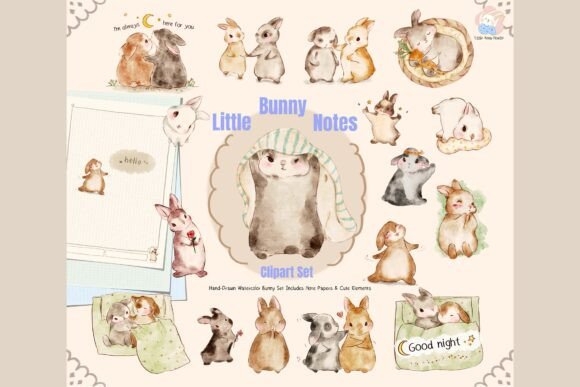
Creating a cohesive digital journal or an engaging classroom resource often hinges on the quality of your visual assets. The Little Bunny Notes Clipart Set offers a charming solution for those seeking to add warmth and personality to their projects without sacrificing professionalism. This collection features hand-drawn watercolor bunnies, aesthetic note papers, and speech bubbles designed to bring a cozy vibe to digital planning, printable crafts, and educational materials. However, simply purchasing a cute clipart set is not enough to guarantee a successful design. Many creators overlook critical details regarding file formats, resolution, and licensing that can derail their workflow or limit their creative potential.
Understanding exactly what you are getting and how to apply these assets correctly is essential. Whether you are a teacher preparing lesson plans, a planner enthusiast organizing your life in GoodNotes, or a small business owner creating products for Teachers Pay Teachers, the way you handle this digital download matters. Let's explore common pitfalls and practical strategies to ensure you get the most out of this adorable collection.
Avoiding Format Confusion: PNGs vs. PDFs
One of the most frequent mistakes creators make when downloading resources like the Little Bunny Notes Clipart Set is misunderstanding the difference between the included file types. The set provides both individual transparent PNG files and PDF versions of the note papers. Beginners often attempt to drag a PDF directly into a graphic design software expecting it to behave like a layer, or conversely, they try to print a low-resolution PNG intended for screen use.
This confusion leads to frustrating results. If you place a PDF page into a digital planner app without converting it first, you may find that you cannot type over the lines or move elements freely. Similarly, printing a standard web-resolution image at 300 DPI can result in pixelated, blurry graphics that ruin the aesthetic of your physical stationery. The Little Bunny Notes Clipart Set includes high-resolution 300 DPI PNGs specifically to prevent this issue, but only if you select the correct file for your specific medium.
To avoid this, always verify your intended output before opening a file. For digital journaling in apps like Notability or GoodNotes, utilize the transparent PNG layers so you can resize and position the bunnies without white boxes obstructing your view. For physical printing, such as making stickers or scrapbooking elements, ensure you are using the 300 DPI PNGs provided. Do not rely on screenshots or downsampled previews; always access the original download folder to maintain the crisp watercolor textures that define this collection.
The Trap of Overcrowding Your Design
Another common oversight involves the sheer cuteness of the assets leading to cluttered designs. The Little Bunny Notes Clipart Set contains 16 unique bunny illustrations, four speech bubble elements, and three grid note paper templates. It is tempting to use every single element on one page to maximize value, but this often results in a chaotic layout that detracts from the content rather than enhancing it.
When too many elements compete for attention, the "cozy" and "calming" vibe intended by the soft watercolor palette is lost. Instead of feeling warm and inviting, the page becomes visually noisy and difficult to read. This is particularly problematic for classroom decorations or study pages where clarity is paramount. If a student or user cannot easily distinguish between the decorative bunnies and the actual text or tasks, the utility of the resource diminishes significantly.
A better approach is to treat the clipart as an accent, not the main event. Select one or two bunny characters per page to create a focal point. Use the speech bubbles sparingly to highlight key quotes or reminders. Leave ample white space around the elements to let the gentle watercolor textures breathe. By curating your selection, you maintain the aesthetic integrity of the Little Bunny Notes Clipart Set while ensuring your final project remains functional and legible.
Navigating Commercial Licensing Correctly
For entrepreneurs and educators selling their work, understanding the license terms is non-negotiable. The Little Bunny Notes Clipart Set allows for commercial use, meaning you can incorporate these graphics into your own digital or printable products for sale on platforms like Etsy or Teachers Pay Teachers. However, a dangerous misconception exists regarding what "commercial use" actually permits.
Many creators mistakenly believe that buying the license allows them to resell the original files themselves. This is incorrect. You may not resell or share the original PNG or PDF files as-is. Doing so violates the intellectual property rights of the artist and can lead to account bans on marketplaces or legal repercussions. The license grants you the right to use the elements as part of a new, transformed product, not to act as a distributor of the raw assets.
To stay compliant, ensure that your final product adds significant value beyond just the clipart. Combine the bunnies with your own layouts, writing prompts, or educational content. Create a cohesive planner or worksheet where the clipart serves as a component of a larger system. While credit is appreciated, it is not required, but maintaining transparency about your sourcing builds trust with your audience. Always review the specific terms provided with your download to confirm you are adhering to the "no reselling original files" rule.
Ensuring Visual Consistency Across Projects
Finally, consider the color harmony when integrating the Little Bunny Notes Clipart Set into existing workflows. The set features soft colors and gentle watercolor textures designed to evoke a specific mood. Pairing these delicate illustrations with harsh, neon, or overly saturated backgrounds can clash, making the bunnies look out of place and diminishing the overall quality of your design.
If you are building a brand or a series of journals, consistency is key. Using a vibrant, high-contrast font or a busy background pattern alongside these soft watercolor bunnies creates a disjointed experience. To achieve a professional look, choose complementary pastel tones or neutral backgrounds that allow the watercolor effects to stand out naturally. Test your combinations in grayscale first to ensure there is sufficient contrast for readability without sacrificing the soft aesthetic.
By paying attention to these details—file formats, design density, licensing boundaries, and color theory—you transform a simple download into a powerful tool for creativity. The Little Bunny Notes Clipart Set is more than just cute images; it is a resource that, when used correctly, elevates your digital journals, classroom projects, and creative endeavors to a higher standard of quality and professionalism.