Vintage Seashells Clipart Set PNG SVG AI: A Practical Guide for Creators
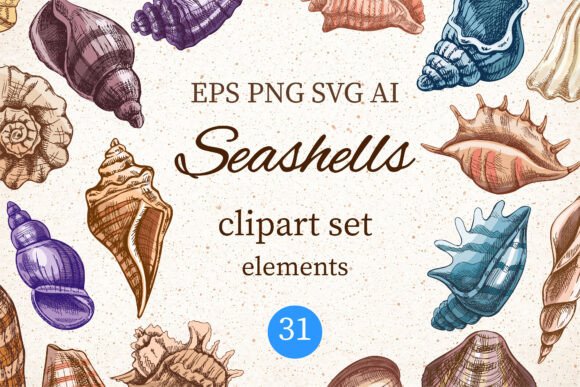
Bringing a soft coastal and vintage ocean aesthetic to your creative projects requires more than just finding an image of a shell; it demands a specific visual language that evokes nostalgia, elegance, and the timeless beauty of the sea. The Vintage Seashells Clipart Set PNG SVG AI collection offers exactly this, featuring 31 detailed, colorful shell illustrations rendered in a classic engraved sketch style. Inspired by antique marine illustrations and beach treasures, these graphics are designed to elevate everything from beach branding to coastal wedding invitations. However, simply downloading a file does not guarantee a professional result. Many creators overlook critical details regarding file formats, resolution, and stylistic application, leading to designs that look amateurish or fail when printed.
Understanding the Value of Engraved Sketch Styles
The appeal of this collection lies in its specific artistic approach. Unlike modern, flat vector art or hyper-realistic photography, the hand-drawn, engraved style bridges the gap between historical scientific illustration and modern graphic design. This aesthetic works exceptionally well for projects requiring a touch of sophistication, such as greeting cards, stationery, and fabric prints. When you integrate these elements into your work, you are tapping into a visual tradition that suggests quality and heritage.
However, a common misunderstanding is assuming that "vintage" means "low quality." Some creators mistakenly believe that older-style graphics should be grainy or pixelated to fit the theme. This is a significant error. In digital design, clarity is paramount. The Vintage Seashells Clipart Set PNG SVG AI provides high-resolution files specifically to avoid this pitfall. Using low-resolution images for print projects like tote bags, mugs, or posters will result in jagged edges and blurriness, instantly undermining the elegant vibe you are trying to achieve. Always prioritize high-resolution assets, even when aiming for a retro look.
Common Mistakes with File Formats and Software
One of the most frequent errors designers make is ignoring the differences between file formats. This set includes individual PNG files, SVG files, an EPS file, and an AI file. Each serves a distinct purpose, and using the wrong one can severely limit your workflow.
- Relying solely on PNGs: While the 31 individual PNG files with transparent backgrounds are excellent for quick edits in Canva or Procreate, they are raster images. If you stretch a PNG too large for a sublimation project or a large wall art piece, it will lose quality. PNGs are best for web use, social media templates, or small-scale prints where scaling isn't required.
- Ignoring Vector Formats (SVG, EPS, AI): For any project involving cutting machines like Cricut or Silhouette, or for professional print production, the SVG, EPS, and AI files are essential. These vector formats allow you to scale the seashell illustrations to any size without losing detail. If you attempt to cut a PNG on a Cricut machine, the software will try to trace the pixels, often resulting in a messy, inaccurate cut path.
- Mismatched Software Compatibility: Beginners often download the AI or EPS files but lack the software to open them. While Adobe Illustrator is the standard, not every creator has access to it. If you do not have Illustrator, the SVG files are your best alternative for vector editing in free tools like Inkscape or browser-based editors. Do not pay for a premium format you cannot utilize.
Avoiding Stylistic Overload and Clashing Themes
Another area where projects often stumble is in the composition and combination of elements. Because this set contains 31 different shells, there is a temptation to use them all at once. Overcrowding a design with too many intricate details can create visual noise rather than a cohesive pattern or frame. The engraved style is detailed by nature; adding too many elements can make the final product look cluttered and confusing.
To avoid this, practice restraint. Select a few complementary shells to create a border, a logo, or a focal point for a wedding invitation. When creating patterns for fabric prints or wallpaper, ensure there is enough negative space between the illustrations to let the "breath" of the design come through. Furthermore, consider your color palette. While the set includes colorful illustrations, the vintage aesthetic often pairs beautifully with muted tones, creams, and sandy neutrals. Applying neon colors to these antique-style sketches can clash with the intended mood, making the design feel disjointed.
What to Check Before You Download and Create
Before integrating the Vintage Seashells Clipart Set PNG SVG AI into your business or personal projects, perform a quick audit of your needs against what the files offer. First, verify your output medium. Are you designing for a screen or for print? If print, confirm that your chosen file format supports the required DPI and scalability. Second, check your software capabilities. Ensure you have the necessary tools to manipulate SVG or AI files if you plan to customize the line weights or colors beyond simple recoloring.
It is also crucial to remember that mockups and preview images are not included in the download. This is a standard industry practice, but it means you must rely on your own vision or third-party mockup generators to visualize how the clipart will look on a pillow, mug, or tote bag. Do not assume the final product will look exactly like the promotional images without testing your own layout first. Creating a small test print or a digital proof before committing to a full batch of merchandise can save you significant time and money.
Maximizing Efficiency in Your Workflow
Efficiency in design comes from organizing your assets correctly. Since this collection provides both individual files and master files (EPS/AI), keep them organized in separate folders. Use the individual PNGs for quick social media posts or scrapbooking layouts where speed is key. Reserve the vector files for complex branding projects, logos, or large-format printing where precision is non-negotiable.
By understanding the strengths of each file type and respecting the stylistic nuances of the engraved sketch style, you can avoid the common traps that lead to disappointing results. Whether you are a freelancer creating a seaside-themed brand identity or a hobbyist making summer stickers, the right approach to these assets ensures your final creation looks polished, professional, and truly captures the spirit of the coast. With careful selection and proper application, these 31 seashell illustrations become powerful tools that transform simple ideas into memorable, high-quality designs.