Minimal Botanical SVG Elements: A Practical Guide for Designers and Creators
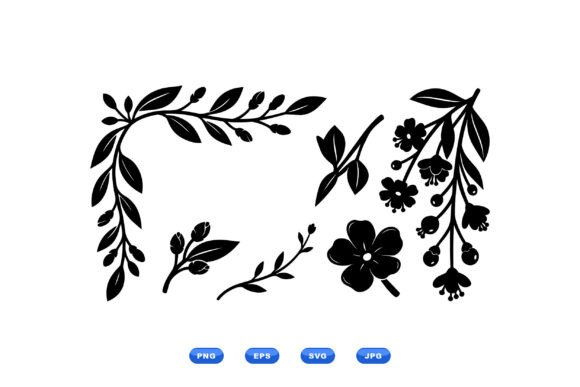
In the landscape of modern graphic design, the ability to access high-quality, versatile assets quickly is often the difference between a stalled project and a polished final product. Minimal Botanical SVG Elements represent more than just a collection of images; they are a foundational toolkit for professionals seeking to infuse elegance and organic structure into their work without sacrificing efficiency. This flat vector set, featuring decorative botanical corner foliage, sprigs, buds, and hanging blossoms, is engineered to streamline the creative process for stationery designers, surface pattern artists, logo creators, and digital content producers.
The value of this resource lies in its adaptability. Unlike raster images that degrade when scaled or complex illustrations that require hours of cleanup, these 100 vector files offer a scalable, clean, and consistent aesthetic. Whether you are an entrepreneur launching a new brand identity or an educator creating engaging course materials, understanding how to integrate these elements into your workflow is essential for maintaining quality control and professional standards.
Understanding the Asset Structure and Format Compatibility
Before integrating any asset into a production pipeline, it is crucial to understand the technical specifications. The downloadable ZIP file containing Minimal Botanical SVG Elements includes four distinct formats: SVG, PNG, EPS, and JPG. Each format serves a specific function within a broader design ecosystem, and knowing when to deploy which file type can significantly reduce rendering times and compatibility issues.
SVG (Scalable Vector Graphics) is the primary format for web-based projects and modern desktop applications. Because SVGs are code-based rather than pixel-based, they remain crisp at any resolution. This makes them ideal for responsive websites, mobile app interfaces, and UI components where performance and clarity are paramount. For developers and digital marketers, SVGs allow for direct manipulation of colors and strokes via CSS, enabling dynamic interactions without needing to regenerate image files.
EPS (Encapsulated PostScript) remains the industry standard for print production. If your workflow involves large-format printing, such as banners, packaging, or high-end stationery, the EPS files ensure that your botanical motifs retain their sharpness during the offset printing process. These files are natively compatible with Adobe Illustrator and other professional vector editors, allowing for deep customization before the final press run.
PNG (Portable Network Graphics) and JPG (Joint Photographic Experts Group) serve as the fallback options for contexts where vector editing is not possible. PNGs are particularly useful for presentations, social media graphics, or email newsletters where transparency is required but vector support is limited. JPGs, while less flexible due to their lack of transparency, are efficient for embedding into documents or viewing on legacy systems. Having all four formats ensures that no matter the output medium—digital, print, or hybrid—you have the correct tool ready for implementation.
Strategic Integration into Creative Workflows
The true power of Minimal Botanical SVG Elements emerges when they are woven into the stages of a project lifecycle, from initial concepting to final delivery. Rather than treating these assets as afterthoughts, forward-thinking creators use them to establish visual direction early in the planning phase.
Pre-Production and Conceptualization
During the brainstorming phase, mood boards are critical for aligning stakeholders on the visual tone of a project. The elegant, flat style of these botanical elements makes them perfect for rapid prototyping. You can drag and drop corner sprigs or hanging blossoms onto a rough layout to test balance and composition before committing to custom illustration work. This "mock-up first" approach saves time by validating design decisions with tangible visuals rather than abstract descriptions.
For branding projects, these elements help define a brand's personality. A tech startup might use the minimal lines to soften a rigid interface, while a wellness coach could utilize the buds and foliage to communicate growth and natural harmony. By selecting specific motifs from the 100-file set, you can create a cohesive visual language that resonates with your target audience before the first line of copy is written.
Execution and Asset Customization
Once the concept is approved, the execution phase begins. Here, the versatility of the vector format becomes a major productivity booster. In tools like Adobe Illustrator, Figma, or Affinity Designer, you can isolate individual paths within the SVG or EPS files. This allows you to:
- Adjust stroke weights to match existing typography.
- Change color palettes to align with brand guidelines instantly.
- Combine multiple sprigs and blossoms to create unique, larger compositions.
- Crop or extend stems to fit specific layout constraints.
This level of control means you are not limited to using the assets exactly as provided. Instead, they act as modular building blocks. For instance, a designer creating a surface pattern can take a single hanging blossom, rotate it, mirror it, and repeat it to generate a seamless tile. This capability transforms a simple clip art set into a robust engine for generating original patterns, saving hundreds of hours compared to drawing each element from scratch.
Post-Production and Quality Assurance
After the design is assembled, the final stage involves quality control and export preparation. Because the source files are vectors, you can perform a final check for alignment and spacing without worrying about pixelation. When exporting for different platforms, the availability of pre-rendered PNGs and JPGs accelerates the delivery process. Marketing teams can immediately use the PNG versions for social media campaigns while the print team utilizes the EPS files for physical collateral. This dual-track approach ensures consistency across all touchpoints of the customer journey.
Optimizing Organization and Long-Term Usability
Efficiency in design is not just about the speed of creation; it is also about the organization of resources. With a library of 100 vector files, proper file management is essential to prevent clutter and ensure long-term usability. A recommended strategy is to categorize the assets based on their function within your workflow.
Create subfolders for "Corner Elements," "Sprigs," "Buds," and "Hanging Blossoms." This granular organization allows you to locate the exact motif needed for a specific task in seconds. Furthermore, consider creating a master template file where you arrange frequently used combinations. This acts as a personal swatch library, enabling you to reuse successful compositions across different client projects while maintaining a consistent aesthetic.
Consistency is another key factor in professional design. Using a unified set like Minimal Botanical SVG Elements ensures that every piece of collateral—from business cards to website headers—shares a common visual DNA. This coherence builds trust with the audience and reinforces brand recognition. It eliminates the risk of mixing styles, such as pairing a hyper-realistic flower with a flat geometric logo, which can dilute the overall message.
Real-World Applications Across Industries
The utility of these botanical elements extends far beyond traditional graphic design. They are adaptable tools for a wide range of professionals:
- Stationery Designers: Use corner foliage to frame wedding invitations, menus, or letterheads, adding a touch of sophistication without overwhelming the text.
- Surface Pattern Artists: Combine sprigs and blossoms to create repeating textures for fabric, wallpaper, or wrapping paper.
- Logo Creators: Integrate a single bud or leaf into a monogram or wordmark to suggest growth, nature, or elegance.
- Bloggers and Content Creators: Utilize the PNG files as decorative accents in blog posts, YouTube thumbnails, or Pinterest pins to break up text and enhance visual appeal.
- Small Business Owners: Apply these elements to packaging labels, social media templates, and promotional flyers to elevate brand perception cost-effectively.
For educators and trainers, these elements can transform dry slide decks into engaging visual narratives. A well-placed botanical accent can guide the viewer's eye or highlight key points, making information more digestible and memorable.
Conclusion: Elevating Your Design Process
Integrating Minimal Botanical SVG Elements into your toolkit is a strategic decision that prioritizes quality, flexibility, and efficiency. By leveraging the diverse file formats and the inherent scalability of vector graphics, you can navigate the complexities of modern design workflows with greater confidence. Whether you are refining a brand identity, developing a new product line, or simply enhancing your daily content creation, these assets provide a reliable foundation for elegant and professional results. The key lies in understanding not just what the files are, but how they fit into the broader context of your planning, execution, and delivery processes. With careful organization and thoughtful application, this collection becomes an indispensable part of your creative arsenal, enabling you to produce high-caliber work consistently and effectively.